

Buying digital tickets has made attending concerts, sporting events, theater performances, and festivals easier than ever. One of the most popular ticketing platforms is AXS, which allows users to purchase, store, and manage event tickets directly from their mobile devices. One of its most useful features is the AXS ticket transfer option, which lets you send tickets to friends or family in just a few taps.
Whether you’ve purchased extra tickets, can’t attend an event, or simply want to share tickets with someone else, understanding How to Transfer AXS Tickets is essential. Fortunately, the process is simple, secure, and designed to protect both buyers and recipients.
In this comprehensive guide, you’ll learn How to Transfer Tickets on AXS, eligibility requirements, troubleshooting tips, and answers to frequently asked questions.
What Is an AXS Ticket Transfer?
An AXS ticket transfer is a feature that allows ticket holders to securely send eligible digital tickets from their AXS account to another person. Instead of taking screenshots or sharing login credentials, the tickets are transferred directly through the AXS platform.
Once the transfer is accepted, the recipient becomes the ticket holder and can use the ticket for entry into the event.
This secure transfer method helps reduce fraud and ensures tickets remain valid.
Why Use the AXS Ticket Transfer Feature?
There are several reasons why users choose to transfer tickets through AXS.
Some common situations include:
- Sharing tickets with friends
- Sending tickets to family members
- Giving away tickets you can’t use
- Splitting group tickets before the event
- Avoiding ticket scams
- Keeping each attendee responsible for their own ticket
Using the official transfer feature is always safer than sending screenshots or PDFs, as many venues require dynamic barcodes that update automatically.
How to Transfer AXS Tickets
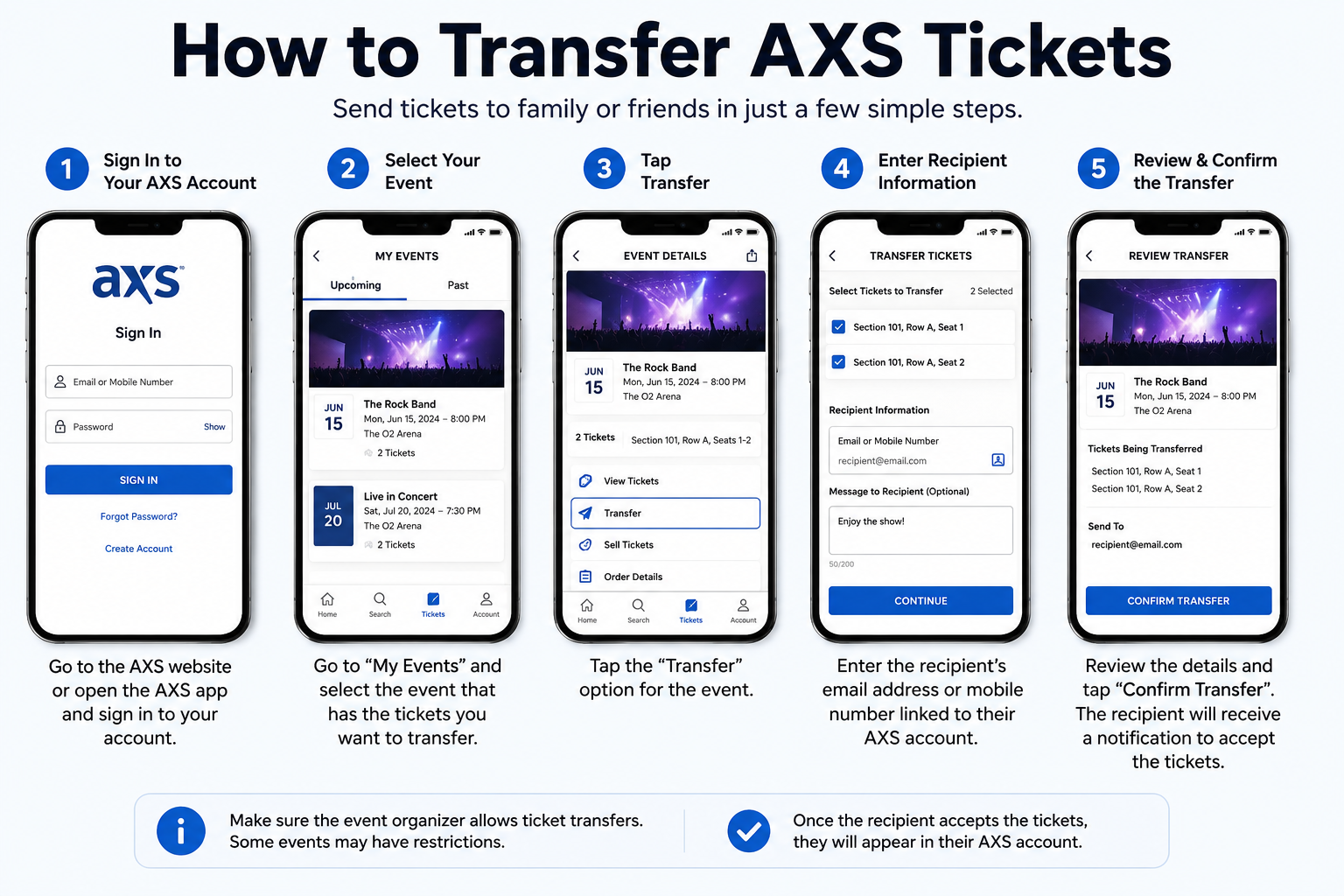
If you’re wondering How to Transfer AXS Tickets, follow these simple steps.
Step 1: Open the AXS App or Website
Log into your AXS account using:
- The AXS mobile app
- The official AXS website
Make sure you’re using the same account that was used to purchase the tickets.
Step 2: Go to Your Tickets
After logging in:
- Select Your Events or My Tickets.
- Choose the event for which you want to transfer tickets.
You’ll see all eligible tickets associated with that event.
Step 3: Select Transfer
Tap or click the Transfer option.
If you don’t see this button, the event organizer may have disabled ticket transfers.
Step 4: Choose the Tickets
If you’ve purchased multiple tickets:
- Select the ticket(s) you want to send.
- Leave the remaining tickets in your account if you’re attending with others.
This flexibility allows you to transfer only the number of tickets needed.
Step 5: Enter the Recipient’s Information
You’ll usually need:
- Recipient’s first and last name
- Email address associated with their AXS account (or the email they’ll use to create one)
Double-check the email address before sending to avoid delays.
Step 6: Confirm the Transfer
Review the details carefully and select Transfer or Send.
The recipient will receive an email notification with instructions to accept the transfer.
Once accepted, the tickets are removed from your account and added to theirs.
How to Transfer Tickets on AXS Using the Mobile App
Many users prefer using the AXS app because it’s fast and convenient.
Here’s How to Transfer Tickets on AXS using your smartphone:
- Open the AXS app.
- Sign into your account.
- Tap Tickets.
- Select the event.
- Tap Transfer.
- Choose the ticket(s).
- Enter the recipient’s email.
- Confirm the transfer.
The process usually takes only a few minutes.
Does the Recipient Need an AXS Account?
Yes. To complete an AXS ticket transfer, the recipient must have an AXS account.
If they don’t already have one, they’ll be prompted to create a free account when accepting the transferred tickets.
This extra step helps ensure ticket security and reduces unauthorized access.
Can You Transfer Part of an Order?
Yes.
If you’ve purchased several tickets in one order, you can often transfer only the tickets you want.
For example:
- Bought four tickets
- Send two to friends
- Keep two for yourself
This makes group event planning much easier.
Can Every Ticket Be Transferred?
Not always.
Some event organizers restrict ticket transfers.
Transfer availability depends on:
- Venue policies
- Artist requirements
- Sports team rules
- Promoter restrictions
- Event security settings
If transfers aren’t allowed, the Transfer button won’t appear in your account.
How Long Does an AXS Ticket Transfer Take?
In most cases, transfers are nearly instant.
After sending:
- The recipient receives an email.
- They accept the transfer.
- The tickets immediately appear in their AXS account.
If the email doesn’t arrive, ask the recipient to check:
- Spam folder
- Promotions tab
- Junk mail
Can You Cancel an AXS Ticket Transfer?
Yes, but only if the recipient hasn’t accepted it yet.
To cancel:
- Open your AXS account.
- Go to your tickets.
- Locate the pending transfer.
- Select Cancel Transfer.
Once the recipient accepts the AXS ticket transfer, it usually cannot be reversed.
Benefits of Using the Official AXS Ticket Transfer
Using the official transfer system offers several advantages.
Secure Transfers
Tickets move safely between verified AXS accounts.
Fraud Protection
Dynamic barcodes reduce the risk of counterfeit tickets.
Easy Ticket Management
Each attendee manages their own ticket.
Instant Delivery
Transfers usually happen within minutes.
No Screenshots Required
Most venues require live mobile tickets instead of screenshots.
Common Problems When Transferring AXS Tickets
Sometimes users encounter issues during the transfer process.
Here are some common problems and solutions.
Transfer Button Missing
Possible reasons include:
- Transfers not yet enabled
- Event restrictions
- Venue policies
- Tickets not fully delivered
Wait until tickets are officially released if the event is still weeks away.
Recipient Didn’t Receive the Email
Check:
- Spam folder
- Junk mail
- Promotions inbox
- Correct email spelling
If necessary, cancel the pending transfer and resend it.
Tickets Not Showing Up
Ask the recipient to:
- Refresh the AXS app
- Log out and back in
- Confirm they’re using the correct email account
Most delays are resolved within a few minutes.
Safety Tips for AXS Ticket Transfers
To ensure a smooth experience, follow these best practices:
- Verify the recipient’s email address before sending.
- Use only the official AXS app or website.
- Never share your account password.
- Avoid sending screenshots as replacements for tickets.
- Complete transfers well before the event to allow time for troubleshooting.
These steps help prevent mistakes and ensure everyone can access their tickets on event day.
Frequently Asked Questions
Is AXS ticket transfer free?
In most cases, yes. AXS does not charge a fee for transferring eligible tickets, although specific event policies may vary.
Can I transfer tickets more than once?
Yes, provided the event allows transfers and the recipient hasn’t already used the ticket. Some organizers may limit the number of transfers.
Can I transfer tickets after checking in?
No. Once a ticket has been scanned and used for entry, it cannot be transferred.
What happens if the recipient doesn’t accept the transfer?
The ticket remains in a pending state until accepted or canceled. You can usually cancel the transfer and resend it if needed.
Can I transfer tickets without the AXS app?
Yes. You can transfer tickets using the official AXS website through your web browser.
Tips for a Smooth AXS Ticket Transfer Experience
To make the process hassle-free:
- Transfer tickets at least a day before the event.
- Confirm the recipient’s email address carefully.
- Ask the recipient to create an AXS account in advance.
- Keep your AXS app updated to the latest version.
- Check event-specific transfer rules before making plans.
Planning ahead helps avoid last-minute issues at the venue.
Conclusion
The AXS ticket transfer feature makes it simple and secure to share digital tickets with friends, family, or fellow event attendees. By learning How to Transfer AXS Tickets, you can confidently send eligible tickets without worrying about screenshots, fake barcodes, or account sharing.
Whether you’re using the AXS website or mobile app, understanding How to Transfer Tickets on AXS ensures a smooth experience from start to finish. Always use the official transfer option, verify recipient details, and complete transfers before event day to enjoy a stress-free entry experience. With these best practices, you’ll be ready to share your tickets safely and conveniently whenever the need arises.