

Sending emails to customers is an important part of business communication, but simply sending more messages does not always lead to better results. Businesses also need to understand how people respond to their emails, what information interests them, and which campaigns encourage them to take action. This is where customer insights become valuable. By reviewing subscriber behaviour and campaign performance, businesses can make more informed decisions about their email communication.
An Email Marketing Tool helps simplify this process by bringing together contact management, campaign creation, scheduling, and performance reporting. Instead of relying only on assumptions, businesses can use available campaign data to understand what is working and where improvements are needed. For small businesses, marketing teams, startups, and growing companies, using these insights can help create more relevant campaigns and maintain better communication with customers.
What Are Customer Insights in Email Marketing?
Customer insights are useful observations about customer interests, preferences, and behaviour. In email marketing, these insights can come from the way subscribers interact with campaigns and the information businesses have about their contact lists.
For example, a business may notice that subscribers click more often on emails about product updates than promotional offers. Another business may find that certain campaigns receive more engagement from a particular customer group. These observations help marketers understand what their audience may find useful.
Some common sources of email marketing insights include:
- Email clicks and link interactions.
- Recorded email opening activity.
- Campaign delivery and bounce reports.
- Unsubscribe and spam complaint activity.
- Contact information and subscriber preferences.
- Responses to different campaign topics and messages.
Customer insights should be interpreted carefully. For example, open tracking can be affected by privacy settings and image-loading behaviour. Clicks and actual customer actions can provide additional information about engagement.
How an Email Marketing Tool Helps Businesses Use Customer Insights
1. Understand Which Email Content Attracts Attention
Not every email topic will interest every subscriber. Some customers may want product information, while others may prefer educational content, company updates, or special offers. Campaign reports can help businesses identify which types of messages receive more attention. For example, an online store may find that product announcement emails generate more link clicks than general promotional newsletters. An Email Marketing Tool with campaign analytics allows businesses to review this activity and use it when planning future campaigns. The goal is not to repeat the same successful email every time. Instead, businesses can understand which topics are relevant to their audience and develop useful content around those interests.
2. Organise Contacts Based on Customer Information
Customer insights become more useful when businesses organise their contacts properly. A growing subscriber list may include new customers, existing buyers, newsletter subscribers, and people interested in different products or services. Sending identical messages to every contact may not always be the best approach. Contact management and segmentation help businesses organise subscribers into relevant groups.
For example, a software company may maintain separate contact groups for product users, newsletter subscribers, and people interested in product updates. It can then prepare communication that better matches each group’s needs. An email platform that supports contact lists, subscriber information, and segmentation can make this process easier to manage.
3. Improve Campaign Content Through Click Data
Clicks provide useful information about how recipients interact with email content. When a subscriber clicks a product link, article, or call-to-action, it indicates interest in that particular part of the message. Businesses can review click activity to understand which links and topics attract attention.
For example, a company promoting three services may notice that one service receives significantly more clicks than the others. This observation can help the marketing team decide which service deserves more attention in a future campaign. Businesses can use click reports to review:
- Which links receive more interactions.
- Which topics attract subscriber interest.
- Whether the main call-to-action is noticeable.
- Which campaign content encourages further engagement.
These observations can guide future content decisions and help businesses make their emails more useful.
4. Identify Problems Through Bounce and Delivery Reports
Campaign performance is not only about engagement. Businesses should also understand whether their emails are being accepted by receiving servers. Bounce reports help identify messages that could not be delivered. A high number of bounces may indicate outdated, incorrect, or otherwise undeliverable email addresses. By reviewing these reports, businesses can identify contact list issues and take appropriate action. An Email Marketing Tool that provides delivery events and bounce reporting helps marketers monitor campaign activity more effectively. Businesses should also maintain permission-based contact lists and remove or suppress contacts when appropriate. This supports healthier email practices and helps reduce avoidable delivery problems.
5. Understand When Subscribers Stop Engaging
Unsubscribes and spam complaints are important signals that businesses should monitor. If a campaign leads to a noticeable increase in unsubscribes, the business may need to review its message frequency, content relevance, or audience selection. Similarly, spam complaints can indicate that recipients did not expect or want the communication. These results should not be ignored. They can help businesses identify whether their email strategy needs adjustment.
For example, a company sending frequent promotional messages may consider reducing the frequency or providing more useful information. It can also review whether subscribers clearly agreed to receive its marketing emails. Monitoring these signals helps businesses make more thoughtful decisions about future communication.
6. Compare Campaign Results Over Time
Reviewing one campaign can provide useful information, but comparing several campaigns can reveal broader patterns.
For example, a business may compare monthly newsletters to understand whether a new subject line approach or content format is receiving more clicks. It may also review whether a particular campaign generates more unsubscribes or delivery issues. An email marketing platform with historical campaign reporting makes it easier to review performance over time. Businesses can compare campaigns based on: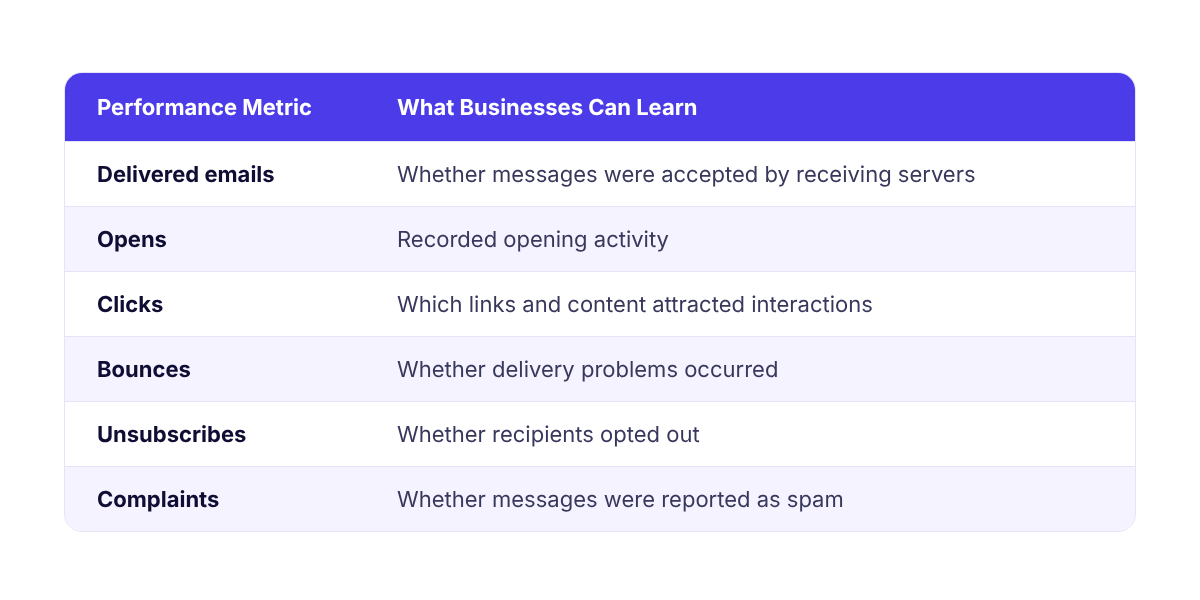
Comparing these results helps marketing teams identify patterns instead of making decisions based on a single campaign.
7. Make Future Campaigns More Relevant
The main purpose of collecting customer insights is to use them to improve future communication. Once businesses understand subscriber interests, they can create campaigns that are more relevant to different audiences. This may involve changing the email topic, improving the message structure, adjusting the sending frequency, or selecting a more suitable contact group.
For example, if a business notices that subscribers frequently interact with educational articles, it can include more helpful resources in its upcoming newsletters. The important point is to use customer insights as guidance rather than treating every interaction as a complete picture of customer preferences.
Practical Ways to Turn Customer Insights into Better Email Campaigns
Having access to campaign data is useful, but businesses also need a clear process for applying it.
Start with a Clear Campaign Objective
Before creating an email, decide what the campaign should achieve. It could be introducing a product, sharing an update, increasing website visits, or providing useful information to customers. A clear objective makes it easier to select the right audience and review the results later.
Use Relevant Contact Groups
Organise subscribers based on meaningful information, such as their interests, customer type, or subscription preferences. Send messages that are appropriate for each group rather than using the same content for every contact.
Review Reports After Every Campaign
Check available campaign data after sending an email. Review delivery events, clicks, bounces, unsubscribes, and complaints to understand how recipients interacted with the message.
Test Different Content Approaches
Businesses can experiment with subject lines, message formats, content topics, and calls-to-action. Change one important element at a time where possible so that the results are easier to interpret.
Keep Subscriber Preferences in Mind
Customer insights should support better communication, not excessive messaging. Respect unsubscribe requests, send emails only to appropriate contacts, and maintain a reasonable campaign schedule.
How Sendr365 Helps Businesses Monitor Email Campaign Activity
Businesses that want to use customer insights effectively need a platform that helps them manage contacts, send campaigns, and review campaign activity.
Sendr365 provides email communication features for businesses, startups, SaaS companies, and developers. Its platform supports marketing campaign creation and scheduling, contact management, transactional email delivery, and REST API integration. Businesses can use Sendr365 to organise contact lists and manage marketing campaigns. Its reporting capabilities provide information about email activity, including sends, deliveries, opens, clicks, bounces, and complaints. These reports can help marketing teams understand how recipients interact with their campaigns and identify areas that may need improvement. Developers can also use REST API integration to connect email sending functionality with websites and applications for transactional communication.
Common Mistakes Businesses Should Avoid When Using Customer Insights
Customer data can support better marketing decisions, but using it incorrectly may lead to poor results. One common mistake is focusing only on open rates. Recorded opens do not always provide a complete picture of engagement because privacy features and image-loading behaviour can affect tracking. Businesses should also consider clicks and meaningful customer actions. Another mistake is sending too many emails. Frequent communication without useful content can lead to unsubscribes and spam complaints. Businesses should choose a sending frequency that suits their audience. Some companies also make decisions based on a single campaign. One result may not represent a long-term pattern. Comparing multiple campaigns can provide a more balanced understanding.
Finally, businesses should avoid treating every click as proof of purchase intent. A click can indicate interest, but it does not necessarily mean that a recipient is ready to buy. Customer insights should be considered alongside other business information.
Final Thoughts
Better email campaigns begin with a better understanding of the audience. Businesses that review customer interactions, organise their contacts, and monitor campaign performance can make more informed decisions about their email communication.
An Email Marketing Tool makes this process easier by providing features for contact management, campaign scheduling, and performance reporting. These capabilities help businesses understand what attracts attention, identify delivery issues, and improve future messages. Rather than sending emails based only on assumptions, businesses should use available insights to create relevant content and maintain meaningful communication with subscribers. With a consistent approach and the right platform, email marketing can become a more effective part of a business’s customer communication strategy.
Frequently Asked Questions
1. How does an Email Marketing Tool help businesses understand customer behaviour?
An Email Marketing Tool provides campaign reports that show activity such as recorded opens, clicks, bounces, unsubscribes, and complaints. Businesses can use these observations to understand how subscribers interact with their emails.
2. Why are customer insights important for email campaigns?
Customer insights help businesses understand subscriber interests and identify which types of messages receive more engagement. This information can guide content, audience selection, and future campaign planning.
3. Which email marketing metrics should businesses monitor?
Businesses should review delivery events, clicks, bounces, unsubscribes, and spam complaints. Recorded opens can also be useful, but they should be interpreted carefully because privacy features may affect tracking accuracy.
4. How can businesses use click data to improve email campaigns?
Click data helps businesses identify which links, topics, and calls-to-action attract interactions. They can use this information to plan more relevant content and improve future campaign messages.
5. Can customer insights help businesses reduce email unsubscribes?
Yes. Reviewing unsubscribe activity can help businesses identify possible issues with message frequency, content relevance, or audience selection. They can use these observations to improve their communication approach.
6. How often should businesses review email campaign reports?
Businesses should review campaign reports after each campaign and compare results over time. Regular reviews help identify patterns and guide improvements to future email communication.