

Subscription-based businesses depend on regular communication with their customers. Whether a company offers software, online learning, digital content, membership plans, or monthly product deliveries, customers need timely information about their subscriptions. From account registration and payment confirmations to renewal reminders and cancellation updates, these messages are an important part of the customer experience. If customers do not receive important notifications, they may become confused about their accounts, payments, or subscription status.
This is why Transactional Email Services are important for subscription-based businesses. They help companies send automated, activity-based emails through their websites and applications. With the right email infrastructure, businesses can organize their communication, connect email functionality with their software, and manage important customer notifications more efficiently.
What Are Transactional Email Services?
Transactional Email Services are platforms that help businesses send automated emails triggered by specific customer actions or system events. Unlike promotional emails, transactional emails usually contain information directly related to a customer’s account, purchase, or activity.
For example, when a customer subscribes to a software platform, the system may automatically send an account confirmation email. When a payment is completed, it may generate a payment receipt. Similarly, when a subscription is approaching its renewal date, the application can send a reminder. These messages are generally sent individually or in response to particular events rather than as part of a general marketing campaign.
Why Do Subscription-Based Businesses Need Transactional Emails?
Subscription businesses often have ongoing relationships with customers. Unlike one-time purchases, subscriptions involve recurring payments, account access, renewals, and changes to service plans. Customers need clear information about these activities. Transactional emails help businesses communicate important updates without requiring employees to send every message manually.
1. Keep Customers Informed About Their Accounts
When someone creates an account or purchases a subscription, they expect confirmation that the process was successful. A welcome or account confirmation email can provide useful information, such as the registered email address, subscription details, and next steps. These messages help customers understand their account status from the beginning.
2. Communicate Payment Updates
Recurring payments are a major part of subscription-based business models. Customers may need confirmation when a payment is successful, information when a payment fails, or an update when their billing details change. Automated payment notifications help keep customers informed and reduce uncertainty around billing activity.
3. Send Subscription Renewal Reminders
Customers should have clear information about upcoming subscription renewals. A renewal reminder can mention the expected renewal date, applicable plan information, and where customers can review their subscription details.
This allows customers to check their account before the next billing cycle.
4. Support Account Security
Subscription platforms often allow users to access personal accounts, manage payment details, and use digital services. Security-related emails such as password reset instructions, login verification messages, and account activity notifications help customers manage access to their accounts. These messages should be generated through secure application workflows and sent only when the relevant event occurs.
Common Transactional Emails Used by Subscription Businesses
Different subscription models require different types of customer notifications. However, several email types are common across many industries.
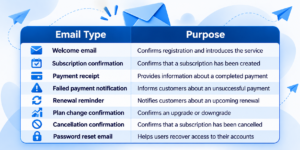
These messages should contain accurate information and clear instructions. Businesses should also avoid including unnecessary promotional content in emails whose primary purpose is to communicate an important account or transaction update.
How Transactional Email Services Work in Subscription Applications
Transactional email sending usually takes place through communication between an application and an email service.
For example, imagine a customer purchasing a monthly subscription from a SaaS platform.
First, the customer completes the subscription process. The application records the relevant transaction or account event. Once the event is confirmed, the backend triggers an email request through the connected email service. The email platform processes the request and handles the sending process. The recipient’s email provider then processes the message. This workflow can be used for payment confirmations, account updates, password resets, and other application-generated notifications.
There are two common methods businesses can use to connect their applications with an email platform.
SMTP Relay Integration
SMTP relay allows a website or application to send emails through an external SMTP server. It is useful for businesses whose existing software already supports SMTP configuration. Developers generally configure the SMTP host, port, username, password, and encryption settings to establish the connection.
For subscription platforms, SMTP relay can support application-generated emails such as account notifications and payment confirmations.
Email API Integration
An email API allows an application to communicate with an email service through programmatic requests. Instead of configuring an SMTP connection, developers can send authenticated HTTPS requests from their application backend.
For example, a subscription application can send an API request when a payment event is confirmed. The request contains the recipient’s email address, subject, and message content. An API-based approach can be useful for custom SaaS platforms, websites, and applications that need direct integration with an email delivery service.
What to Look for When Choosing Transactional Email Services
Choosing an email service requires more than comparing sending prices. Subscription businesses should consider their technical requirements, communication volume, and the importance of their customer notifications.
1. SMTP and API Integration
A suitable service should support the integration method used by your application. SMTP relay can be helpful for existing systems that already support SMTP, while an email API may be more suitable for custom applications and developer-led workflows. Having the appropriate integration option can make it easier to connect email sending with existing business software.
2. Domain Authentication
Email authentication is an important part of business email infrastructure. Businesses should configure SPF, DKIM, and DMARC records according to their email provider’s instructions. These standards help receiving email systems verify sender information and apply the domain owner’s email authentication policies. Correct configuration does not guarantee inbox placement, but it is an important part of responsible email sending.
3. Sending Controls and Monitoring
Subscription businesses should understand their email provider’s sending limits, rate limits, and account restrictions. They should also monitor available sending information and review problems such as rejected requests, bounced messages, and unsuccessful deliveries. Monitoring helps technical teams identify issues and investigate them before they affect more customer communication.
4. Developer Documentation
Clear documentation can make implementation and maintenance easier. Developers should be able to understand authentication requirements, API endpoints, SMTP settings, request formats, and error responses. Code examples and integration instructions are particularly useful for businesses building custom subscription applications.
5. Contact and Suppression Management
Businesses that also send marketing campaigns need an organized way to manage subscribers and excluded contacts. Suppression filtering helps prevent messages from being sent to addresses that should be excluded from applicable sending activity. Marketing preferences and transactional communication should be managed carefully, with appropriate attention to recipient choices and applicable requirements.
Best Practices for Managing Transactional Emails
Choosing a suitable service is only one part of the process. Businesses should also follow good practices when designing and managing their transactional email workflows.
Use clear subject lines. Customers should understand the purpose of an email before opening it. For example, a subject such as “Your Subscription Payment Was Successful” is more informative than a vague promotional heading.
Send emails after confirming the relevant event. Payment confirmations should be triggered after the payment system confirms the transaction. This helps avoid sending incorrect information.
Keep messages simple. Include the details customers need, such as transaction references, subscription information, renewal dates, or account instructions. Avoid unnecessary content.
Protect sensitive information. Do not include passwords, full payment card details, or other sensitive credentials in ordinary email messages. Use secure account pages for information that requires authentication.
Handle sending errors carefully. Applications should be designed to handle failed API requests, temporary errors, and rate limits. They should avoid uncontrolled repeated sending that could result in duplicate notifications.
Test email workflows before launch. Test welcome emails, payment notifications, renewal reminders, and password reset messages using suitable test accounts. Check the content, links, and recipient information before using the workflow with real customers.
How Sendr365 Supports Subscription-Based Businesses
Subscription-based businesses need an email solution that can connect with their websites and applications while supporting their wider email communication requirements.
Sendr365 provides email delivery capabilities for businesses, startups, SaaS platforms, and developers. Its SMTP relay and REST API options allow applications to connect with email-sending functionality.
For developers, API documentation and examples for Node.js, Python, and cURL help explain how to integrate email sending into application workflows. SMTP connection settings are also available for systems that use SMTP-based integration. In addition to email delivery, Sendr365 provides campaign-related capabilities such as contact and list management, campaign scheduling, suppression filtering, and campaign metrics. These capabilities can support businesses that need to manage application-generated emails alongside their broader marketing communication.
Conclusion
Transactional emails are an important part of subscription-based business operations. Customers depend on these messages for account confirmations, payment updates, renewal reminders, security instructions, and subscription changes.
The right Transactional Email Services can help businesses connect their applications with email infrastructure and organize these notifications through automated workflows. Before selecting a platform, businesses should review SMTP and API integration options, domain authentication, sending controls, monitoring capabilities, and developer documentation. As subscription businesses grow, having an organized email communication process becomes increasingly important. With suitable infrastructure and well-designed workflows, businesses can manage customer notifications more efficiently and provide clearer communication throughout the subscription lifecycle.
Frequently Asked Questions
1. What are Transactional Email Services used for in subscription businesses?
They help subscription businesses send automated messages related to customer activity, including account confirmations, payment receipts, renewal reminders, password resets, and cancellation notifications.
2. Why are transactional emails important for SaaS subscriptions?
SaaS customers need regular updates about their accounts, payments, subscription plans, and access. Transactional emails help applications communicate these updates without requiring manual intervention for every message.
3. What is the difference between transactional emails and marketing emails?
Transactional emails provide information related to a customer’s account or activity, such as a payment receipt or password reset. Marketing emails promote products, services, offers, and newsletters.
4. Can subscription applications use an email API?
Yes. Applications can use an email API to send automated messages through authenticated requests. This approach is commonly used in custom websites, SaaS platforms, and backend applications.
5. Is SMTP relay suitable for subscription-based businesses?
Yes. SMTP relay can be suitable for subscription applications that already support SMTP configuration. It allows the application to send emails through an external SMTP service.
6. How can businesses manage failed transactional emails?
Businesses should monitor sending responses, review bounce information, and handle temporary errors carefully. They should also implement appropriate retry logic to avoid duplicate notifications.
7. What should businesses consider when choosing Transactional Email Services?
They should review SMTP and API support, domain authentication, sending limits, monitoring, developer documentation, suppression management, and the integration requirements of their applications.